Asset Management

Asset management your whole organisation can actually use

We are not an enterprise asset management suite like ServiceNow. We are a great deal better than nothing — and a great deal better than the spreadsheet your team is quietly maintaining right now. Close to what the big platforms do, without the project, the consultants, or the learning curve.
The Problem

Most IT teams know roughly what hardware they own. Roughly.

The list lives in a spreadsheet. One person maintains it, usually between two other jobs. It was accurate the week it was written.

Nobody outside IT can see it

Every question about a device — who has it, when its warranty ends, what it costs — comes back to the service desk as a ticket.

Corrections arrive too late

A device moved to another team in March. The spreadsheet learns about it in December, if at all.

Nobody trusts a number they cannot check

A figure that appears once a year from a system people have no access to gets argued with, not accepted.

What this is not — so you can decide quickly:

  • No discovery, no agents. We do not scan your network or install anything on endpoints. If you run Intune, Lansweeper or SCCM, keep them.
  • No enterprise CMDB project. No dependency mapping, no service modelling, no six-month implementation.
  • Not a replacement for your MDM. We sit on top of it.
Chargeback

Stop being the help desk for “what does this laptop cost?”

Charging hardware back to departments is nobody’s favourite subject. It is also unavoidable in most organisations — and it is usually done once a year, in a spreadsheet, by someone reconstructing twelve months from memory.

The problem is not the calculation. It is that only IT can see the numbers.

1   Set the rules once

Define what a device type costs per period, and point it at the target that makes sense for you — a cost centre, a location, or a company. Devices that should never be charged go on an exclusion list.

2   Run it, keep the evidence

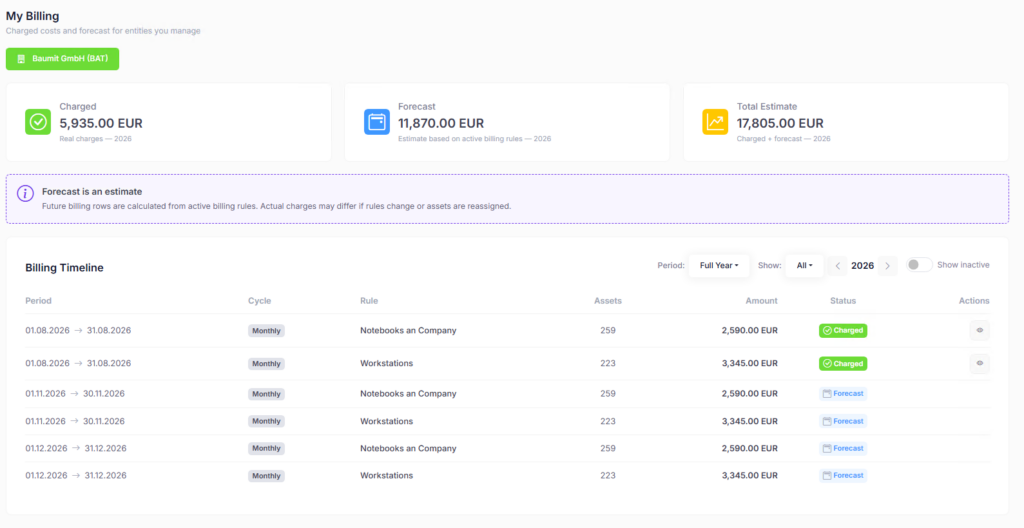
A billing run produces charge records: one line per device, per period. Each record freezes the price, the currency and the target as they were when the run happened.

3   Hand the numbers over

Cost centre owners, location owners — and end users, if you want — see what is about to be charged to them, before it is charged.

au2mator My Billing view showing charged and forecast hardware costs with a monthly billing timeline per rule

“I’m handing that control out. A manager or cost centre owner shouldn’t have to ask — we give it to them. That’s exactly where the value is.”

Michael Seidl, au2mator

Raise a price next quarter and last quarter’s invoice still shows last quarter’s price. When someone questions a charge eighteen months later, the answer is in the record, not in someone’s memory.
Warranty & Lifecycle

Next year’s hardware budget, visible today

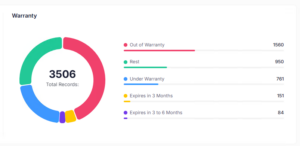
Every asset list has warranty dates in it somewhere. Very few make them useful. The asset overview opens on a warranty breakdown: how many devices are out of warranty, how many expire within three months, how many in three to six months, how many are still covered — and how many have no warranty date at all, which is usually the number worth looking at first.

Warranty dashboard splitting 3,506 assets into out of warranty, under warranty and expiring within three and six months

Each segment is a starting point

Click “expires in three to six months” and you are in the filtered list of exactly those devices — ready to export, assign, or plan a replacement wave around. In the list itself, every device shows days remaining, or days since it lapsed.

Warranty Sync (optional add-on)

Maintaining warranty dates by hand works until you have a few hundred devices. Warranty Sync retrieves them from Dell, HP, Apple, Fujitsu and Lenovo through the au2mator web service, so the overview stays current without anyone typing.
Delegation & Roles

Let the people closest to the hardware maintain it

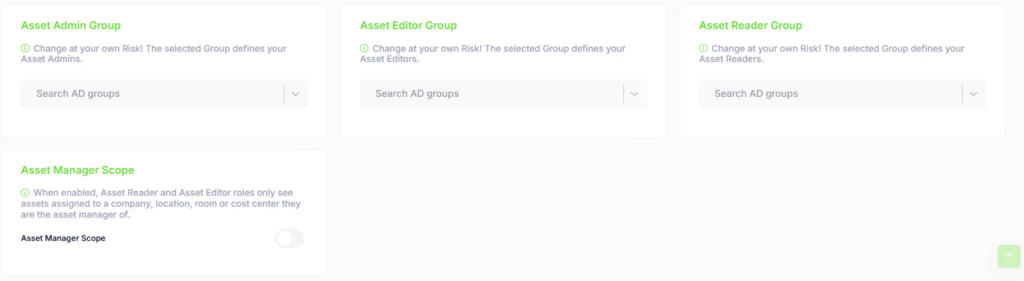
The reason asset data goes stale is almost always the same: one team is responsible for all of it, and that team has other work. Asset administration can be delegated and scoped, with read-only or full edit rights.

Scoped, not global

A location owner maintains the devices at their site. A manager sees what their team has. Nobody sees more than they should, and nobody has to file a ticket to correct an obvious mistake.

Users see their own

End users see their own devices. Managers see their team’s. That alone removes a surprising share of service desk traffic.

Asset role settings with separate Admin, Editor and Reader groups and the Asset Manager Scope toggle

Your Data Model

It ships with sensible values. Then you make it yours.

Eleven entity types cover the structure most organisations need — and all of them are yours to maintain. We ship starting values so the system is usable on day one.

Hardware AssetConfiguration ItemCategoryModelCompanyCountryLocationRoomUserGroupStatus

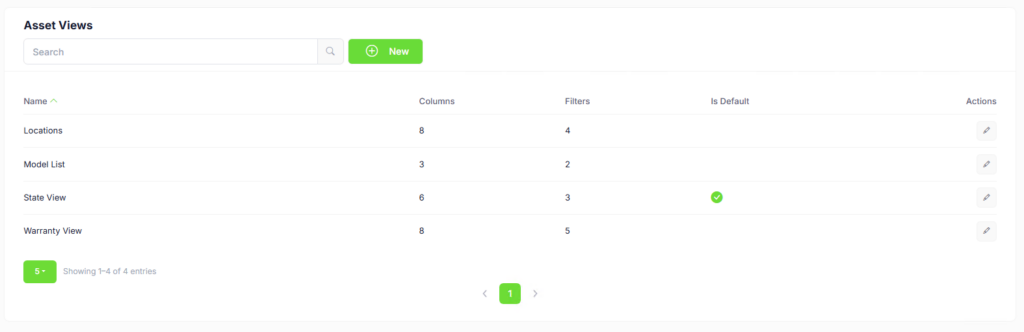
Build your own views, choose which columns appear, save them, and make one the default for everyone.

Asset Views list showing saved views with their column and filter counts and the default view marked

Self-Service Portal

Where it stops being an inventory and starts being useful

Asset management inside au2mator is not a separate module you visit. It is available to every service you build.

Services that ask for a device

Add an asset field to any request form. The user picks one of their devices — no serial numbers typed from the bottom of a laptop.

Services that ask for any entity

Not just devices. A form can ask for a location, a company, a category — any entity in the model, filtered how you need it.

Asset Actions

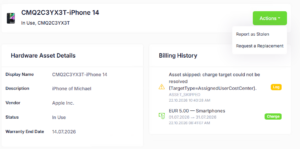
Users open their own device and act on it directly: request software, report it stolen, or flag that it is no longer theirs.

Asset detail page for a smartphone with hardware details, billing history and the Actions menu offering Report as Stolen and Request a Replacement

This is the self-service part of self-service asset management: the people who use the hardware are the ones keeping its data honest.

Import

Your devices are already in Intune. Bring them over.

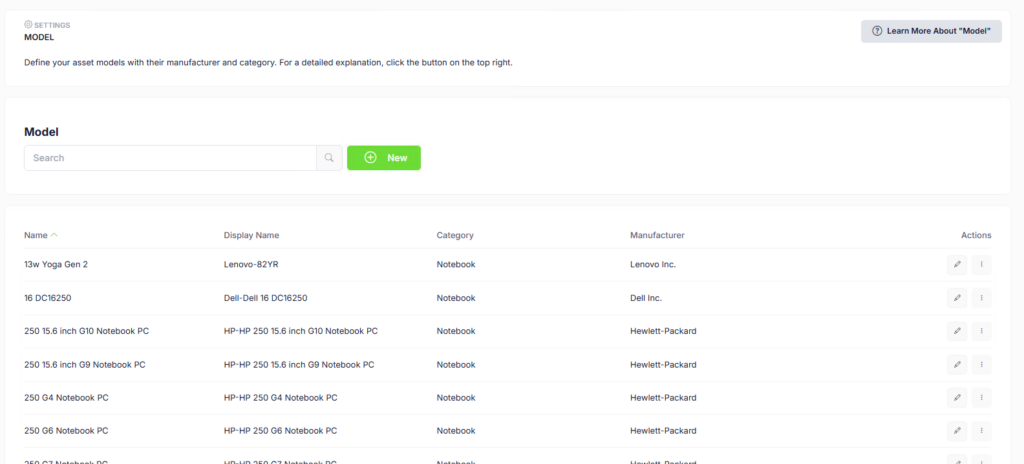
If you run Microsoft Intune, you do not need to type anything. Import devices, models and manufacturers, map them to your structure, and keep them in sync. Intune stays the system of record for device management — au2mator adds ownership, cost, delegation and self-service.

Model settings listing asset models with their category and manufacturer after an Intune import

History

Every change is recorded — what changed, who changed it, when. Shown as a timeline on the asset itself.

API

Assets are available over the au2mator API for integration with whatever else you run.
Frequently Asked Questions

What you want to know.

Does au2mator replace Intune, Lansweeper or SCCM?
No — and it is not meant to. Those tools discover and manage devices, and they do it well. au2mator sits on top of them and adds what they do not cover: ownership, cost allocation, delegated maintenance and self-service access for the people who actually use the hardware.
Scope and effort. Enterprise platforms cover dependency mapping, service modelling and full CMDB discipline — and require a project to match. au2mator covers the parts most organisations actually use day to day, and you can run it without consultants.
No. There is no discovery and nothing is installed on endpoints. Asset data comes from your existing sources — an Intune import, another system, or manual entry.
Yes. Asset administration can be delegated and limited by scope, with either read-only or full edit rights. A location owner can maintain the devices at their site without seeing anyone else’s, and without receiving admin rights to the portal.
Yes. You define what each device type costs per period and point it at a cost centre, location or company. Billing runs produce per-device charge records that freeze the price and target at the time of the run, so past periods stay verifiable.
Yes, if you want them to. My Billing shows cost centre owners, location owners and — optionally — end users what is about to be charged to them, before it is charged. They can flag a device that is no longer theirs from the same screen.
You can maintain them yourself, import them, or license the optional Warranty Sync add-on, which retrieves them from Dell, HP, Apple, Fujitsu and Lenovo through the au2mator web service.
Asset Management is an add-on to the au2mator Self-Service Portal. Warranty Sync is licensed separately again. See the pricing page for current details.

See it with your own data in mind

We will walk you through asset management in a live session, with your environment and your questions — not a canned demo script.
Asset Management is an add-on to the au2mator Self-Service Portal. See pricing and licensing