Intune Asset Management

Intune manages your devices. It does not manage your assets.

If you run Microsoft Intune, you already have an accurate, current list of every managed device — serial numbers, models, manufacturers, hardware specifications, enrolment state. What you do not have is everything that happens around those devices.
The Gap

What Intune does not answer

Intune is a device management platform, and a good one. These questions simply fall outside its purpose:
  • Which cost centre pays for this laptop?
  • May the site manager in Linz maintain the devices at their location — without becoming a global administrator?
  • What is the hardware at this location costing us per month?
  • When does the manufacturer warranty end, and how many devices expire next quarter?
  • How does an employee request software for their own device without knowing its serial number?
  • What about the monitors, docking stations and phones Intune never sees?

None of these are gaps in Intune. They are a different job — and that job is what au2mator does.

The Approach

Keep Intune. Add the layer above it.

au2mator does not replace Intune and does not compete with it. Intune remains the system of record for device management and compliance. au2mator imports those devices and becomes the place where ownership, cost, responsibility and self-service live.

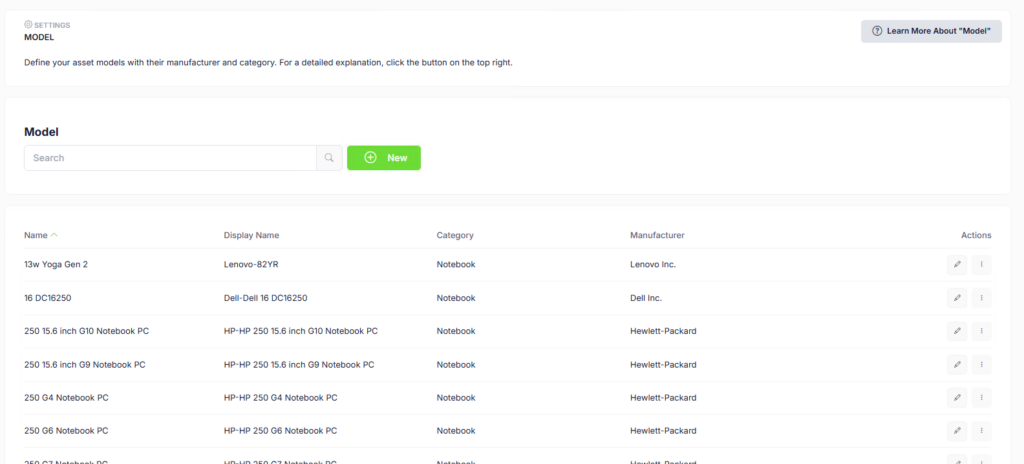
Model settings listing asset models with their category and manufacturer after an Intune import

How the import works

Open source, not a black box

The Intune import is a PowerShell script that runs as a scheduled au2mator automation — and the script is published on GitHub.
That is deliberate. You can read exactly what runs inside your tenant before it runs: which Graph endpoint it calls, which fields it maps, what it creates. No opaque connector, no “trust us” integration. If your naming conventions differ, or you need an extra field carried across, you change the script — it is yours to extend.

[ GITHUB-LINK FOLGT ]   View the import scripts on GitHub →

1   Read from Microsoft Graph

/v1.0/deviceManagement/managedDevices — the same source the Intune console uses, with paging so large estates come across completely.

2   Match before creating

Reads the users, companies, categories, models and statuses that already exist in au2mator, so it matches instead of duplicating.

3   Create what is missing

New manufacturers become companies. New device types become models. New device owners become users. Then the devices are created as hardware assets.

4   Leave your structure intact

The import maps into your categories and your statuses — the ones you defined — not a fixed schema.

Credentials stay where they belong. The script reads its secrets from Azure Key Vault and authenticates with a managed identity. No API keys in scripts, no passwords in scheduled tasks.

Run it once, or run it nightly. As a one-off migration it gets you from an empty system to a populated one. Scheduled, it keeps au2mator current as devices are enrolled and retired — without anyone maintaining a spreadsheet.
Warranty

Warranty data, added automatically

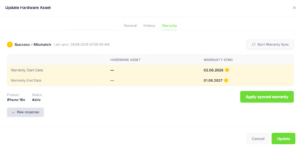
Intune does not carry manufacturer warranty dates. A separate automation reads your imported assets, retrieves warranty information from the manufacturer — Dell, HP, Apple, Fujitsu and Lenovo — and writes it back to each asset.
That is what fills the warranty overview: how many devices are out of warranty, how many expire within three months, how many in three to six. See the warranty overview →

Warranty Sync comparing the stored warranty dates with the manufacturer data and offering to apply the synced values

Warranty Sync is a separately licensed add-on. See pricing →
Not only Intune

The devices no management tool ever sees

The same mechanism works for other sources. Existing scripts cover SCCM / Configuration Manager exports, and a direct SQL source sync is in production use where asset data lived in a database rather than a management tool.
Devices that no management tool ever sees — monitors, docking stations, phones, furniture if you want — are created directly in au2mator or imported from CSV.

This matters more than it sounds. The reason most asset lists are wrong is that they only contain what one tool knows. A list that covers everything is the one people trust.

After the import

What you get once the data is in

The import is the beginning, not the point.

Cost transparency

Cost centre owners see what their team’s hardware costs — and can correct it themselves. Chargeback →

Delegated maintenance

Site and team managers maintain their own devices within a defined scope, without portal admin rights.

Self-service on the device

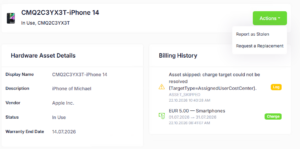
End users see their own devices and start services directly from them — request software, report one stolen, flag one that is no longer theirs.

Asset detail page for a smartphone with hardware details, billing history and the Actions menu offering Report as Stolen and Request a Replacement

Frequently Asked Questions

What you want to know.

Does au2mator replace Intune?
No. Intune remains your device management and compliance platform. au2mator imports the device data and adds what Intune does not cover — ownership, cost allocation, delegated maintenance and self-service.
Devices with their manufacturer, model, serial number and hardware details from Microsoft Graph, along with the assigned user. Manufacturers, models and users that do not yet exist in au2mator are created during the import.
As often as you schedule it. It runs as an au2mator automation, so nightly is typical — but a one-time migration run is equally valid if your estate changes slowly.
No. The import script is provided and published on GitHub, and we set it up with you. If your team wants to adapt it to a local naming convention or carry additional fields across, the source is right there to extend.
Yes. The scripts are public on GitHub. You can review exactly which Graph endpoints are called, which fields are mapped and what gets created in your environment — before anything runs in your tenant.
In Azure Key Vault, with the automation authenticating through a managed identity. API keys and client secrets are not stored in the script itself.
Yes. Monitors, docking stations, phones and anything else can be created directly or imported from CSV. Exports from SCCM / Configuration Manager and direct SQL sources are also supported.
Intune does device management — configuration, compliance, applications. It does not model cost centres, delegated ownership or chargeback, and it does not cover assets it does not manage. Those are different problems, which is why most organisations end up maintaining a spreadsheet next to Intune.
No. Each run reads the existing users, companies, categories, models and assets first and matches against them before creating anything.

See it against your own Intune tenant

In a demo call we will walk through the import with your environment in mind — how your device data maps, what you would get on day one, and what it takes to run.
Asset Management is an add-on to the au2mator Self-Service Portal. See pricing and licensing